A PDF Invoice, Turned Into Money That Actually Moves
Invoices arrive as PDFs, get typed into an accounting package by hand, wait for someone to approve them, and get paid from a bank portal in another tab. We collapsed that into one flow — extraction, line-item approval, and the payment itself.
Industry
Healthcare Finance
Solution
Invoice & Payments Platform
Engagement
~6.5 Months, Ongoing
Services
AI & Fintech Development
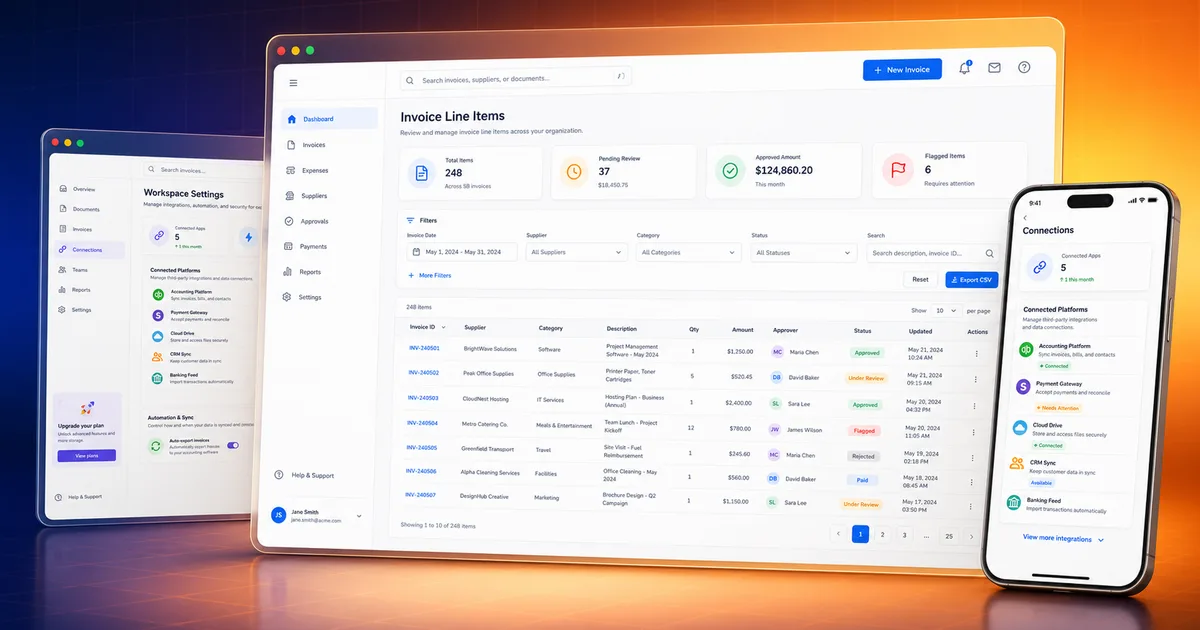
The Invoice Nobody Wanted to Touch
A dental group receives supplier invoices as PDFs. Someone opens each one, reads it, and types it into an accounting package — and if the group runs several organisations across two different accounting platforms, they do that twice, in two systems, with two logins.
Then the invoice has to be approved. Not as a whole, but line by line, by the associate whose work it relates to. And then it has to be paid, which happens somewhere else entirely. Every handoff is a place for the process to stall.
The Problems We Set Out to Solve
These are the six problems the intake sets out — and the platform answers each one directly rather than adding a dashboard on top of them.
Invoice data typed out of PDFs by hand — slow and error-prone
No unified system across two different accounting platforms
No granular approval workflow for invoice line items by associate
No automated payment processing tied to the bank account
Managing several practice organisations from one account was painful
Fragmented logins across related systems
Extract, Approve, Pay — In One Place
The design goal was to remove every handoff. An invoice should be able to arrive, be understood, be approved by the right person, and be paid, without leaving the product.
Extraction With an Audit Trail
PDFs are parsed and the fields extracted by AI — and both the raw text and the structured result are stored, so an extraction can always be checked against what was actually on the page.
Approval at the Line, Not the Invoice
Associates approve the individual line items that relate to their work; the parent invoice's status is derived from its lines rather than set by hand.
Payments That Report Back
Payments initiate over bank rails and their status flows back via webhook, automatically recalculating the invoice and syncing it to the accounting platform.
Two Accounting Platforms, One Model
The accounting operations are abstracted behind one interface, with per-organisation token management and status mapping between the two.
What the Platform Does
Invoice Management
Upload, view and edit invoices with PDF extraction, folder organisation, and sync to the accounting platform.
Inbox
Inbound email processing that pulls attachments out and turns them into invoices automatically.
Line Item Reports
Detailed reporting across invoice line items, filterable by associate.
Approver Queue
The line items awaiting a given approver, with bulk and individual approval actions.
Rules & Automation
Email-based routing rules that assign the chart of account automatically as invoices arrive.
Folders & Tags
A hierarchical folder structure plus custom tags for categorising invoices however the practice thinks.
Associates
Manage the associates who approve line items, including their password-setup flow and their own portal.
Payslips
Generate, preview and email payslips to associates based on the amounts they have approved.
Accounting Sync
Connect both accounting platforms, sync organisations, push invoices and fetch the chart of accounts.
Payments
Initiate and track payments over three bank rails, with status updates arriving by webhook.
Banking
Link bank accounts, view transactions and statements, and manage vendor bank details for transfers.
Onboarding
Business verification and bank-account linking, including beneficial-owner identity verification.
Roles & Permissions
Three global roles plus custom per-organisation roles, with per-tenant permission sets.
Team & Support
Create org members, assign permissions, and impersonate a user to debug what they are actually seeing.
Associate Portal
A separate login and dashboard where approvers see only their invoices, approvals, profile and payslips.
Laravel, Two Auth Guards, Bank Rails
Backend
Auth & RBAC
Accounting & Payments
Extraction
Five Phases, Payment Rails Last
- 1
Core Invoice Management
The upload, extraction and invoice model — everything else depends on getting the invoice into the system correctly.
- 2
Accounting Integration & Approvals
Both accounting platforms behind one interface, and the line-item approval workflow on top of them.
- 3
RBAC
Global roles plus custom per-organisation roles, so each practice can shape its own permission model.
- 4
Banking & Payments
Bank linking, payment initiation over three rails, and webhook-driven status that recalculates the invoice automatically.
- 5
Cross-Platform SSO
Single sign-on across the client's related systems, with user provisioning and bidirectional profile sync.
What Was Delivered
5
User Roles
2
Accounting Platforms
3
Bank Payment Rails
6
Challenges, 6 Solutions
A PDF invoice becomes structured, auditable data — with the original text kept alongside it, so any extraction can be checked.
Approval happens at the line item, by the associate it concerns, and the invoice status follows from its lines rather than being set by hand.
Payment initiates and reports back inside the same product, updating the invoice and the accounting platform without anyone re-keying it.
Several practice organisations, across two accounting platforms, are managed from one account and one login.
Frequently Asked Questions
Yes. Payments initiate over bank rails — this platform supports three — and their status flows back via webhook, automatically recalculating the invoice and syncing it to the accounting platform. The extract, approve and pay steps all happen inside one product, without moving to a separate bank portal in another tab.
Services Behind This Build
Explore Other Case Studies
Still typing invoices into an accounting package?
We build the flow that extracts, routes, approves and pays — with an audit trail behind every step.
Talk to a Delivery Expert