A Truck Breaks Down and the System Starts Calling Dealers Until One Says Yes
When a commercial truck loses a tire on the highway, someone has to find a service dealer who will actually go. We built the platform that turns that breakdown into a ticket, dials eligible dealers in rotation until one accepts, tracks the ETA, and keeps the fleet and the driver informed until the job is closed.
Industry
Commercial Fleet / Roadside Service
Solution
Multi-Tenant White-Label Dispatch
Engagement
Dedicated Team, Ongoing
Services
Product Engineering & AI
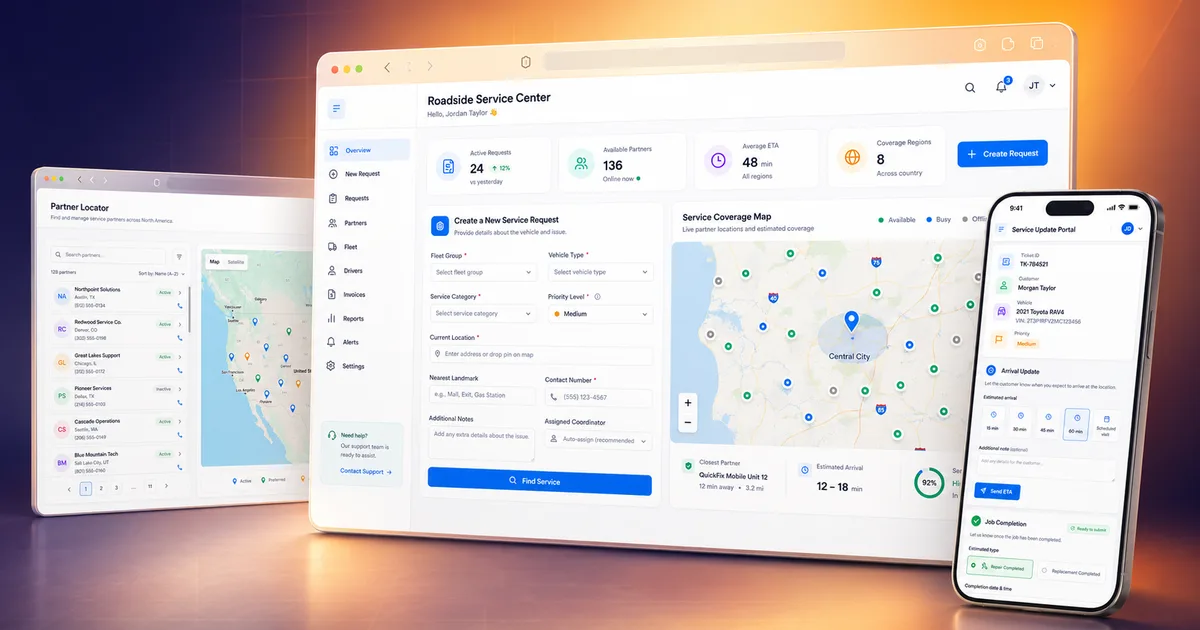
The Clock Starts When the Truck Stops
A commercial truck stopped on the shoulder is a load not moving, a driver stranded, and a delivery window closing. Getting it rolling again means finding a tire or mechanical shop that covers that stretch of road, is open at that hour, and will actually take the job — then confirming they are on the way.
That work was done on the phone. A call-center agent opened a ticket, then started dialling shops one at a time: no answer, declined, closed for the night, wrong service. Meanwhile the fleet was calling to ask where their truck was, and the answer lived in whichever agent happened to be handling it.
What Was in the Way
The hard part was never storing the ticket. It was reaching a dealer who would go, and doing it without a person working down a list.
Finding an eligible dealer meant manual calls — distance, service type, coverage and opening hours all checked by hand
Dealer availability changes by day, by hour and after hours, and a call placed into a closed window is a call wasted
Several customer brands each needed their own portal, phone numbers and business rules, without forking the platform
Fleets and drivers had no reliable ETA once a job was accepted, so they phoned the call centre to ask
On-site service reports and their photos arrived separately from the ticket they belonged to
Let the Platform Make the Calls
Each problem maps to a part of the system. The automated dealer rotation is the one that changes the working day; the rest is what makes its result usable.
Automated Dealer Rotation
The platform dials and texts eligible dealers one after another until a job is accepted. Declines advance the rotation automatically, and no-answers, phone extensions and after-hours numbers are each handled as their own case rather than dropping the ticket.
Schedule-Aware Eligibility
A dealer is only called if it offers the service needed, covers the region, sits inside the radius and is inside its own coverage window. Out-of-window attempts route to after-hours or backup numbers instead of ringing an empty shop.
One Engine, Many Brands
A multi-tenant white-label core serves around fifteen branded portals, each with its own identity, phone numbers and business rules — including bilingual English and French routing that follows the portal for customer messages and the dealer for dealer messages.
AI at the Two Manual Ends
An AI voice agent can take the breakdown call from the driver and open a real ticket from it, and an image model reads and classifies the photos attached to service and warranty reports — the two places where a person was previously transcribing.
What the Platform Does
Ticket Intake, Three Ways
A ticket can be opened by call-centre staff, by a fleet or dealer in the web portal, or automatically from an AI voice call with the stranded driver.
Dealer Rotation Engine
Sequential outbound calls and texts to eligible dealers, advancing on decline, with no-answer, extension and after-hours handling built in.
Eligibility & Radius Matching
Matches the needed service type against dealer capability, region coverage and distance before a single call is placed.
Coverage Schedules
Per-dealer weekly coverage blocks with day, after-hours and backup phone windows, and logging for attempts that fall outside them.
Priority Rules
A fleet can have a preferred dealer forced to the front of the rotation, specific areas can hold short-term first-call priority, and some dealers are restricted to named fleets only.
ETA & Roll-Time
The accepted dealer reports arrival and completion times, and the fleet and driver are notified as those change.
Road Service Reports
The on-site technician files a service report with photos, which can also run standalone when no ticket exists yet.
Photo Gallery with AI Analysis
Ticket images are indexed automatically and analysed by an image model for damage tagging and classification, surfaced as captions and badges on the gallery.
Warranty Claims
Capture, optical extraction from tyre identification photos, an AI determination across all damage images, and a generated report a reviewer can edit before submission.
Reviewer Workflow
A dedicated reviewer role with an editable report, approval step and full audit log — duplicates are flagged for a human rather than silently blocked.
White-Label Portals
Per-brand logo, colours, sending addresses and ETA options, so each customer company gets its own front door onto the same engine.
Bilingual Communications
English and French messaging, routed by the portal for fleet and customer communications and by the dealer for dealer-facing calls and messages.
Ticket Status Tracking
Open, review, attention-needed, scheduled and closed states, so a stalled job is visible rather than forgotten.
Escalation Jobs
Scheduled background jobs chase tickets that stop progressing after hours, retry failed lookups and keep the image pipeline moving.
Notifications
SMS and email to fleets, drivers and dealers at the points in the job where silence causes a phone call.
The Stack
Application
Data & Platform
Voice & Messaging
AI & Imaging
How We Built It
- 1
One Core, Many Front Doors
A single dispatch engine with per-brand configuration, so a new customer portal is a configuration and a deployment target rather than a copy of the codebase.
- 2
The Dispatch Engine First
Eligibility, radius, coverage schedules and priority rules were built before anything cosmetic, because a dispatch platform that calls the wrong dealer is worse than a phone.
- 3
Rotation as a State Machine
Every way a call can fail — declined, unanswered, an extension, out of hours — became an explicit transition, rather than an error that stalls the ticket.
- 4
AI Where a Person Was Transcribing
Voice intake opens a ticket from a driver call, and the image pipeline reads and classifies report photos. Both were added at the points where a human was retyping what a machine could read.
- 5
Warranty as a Skin, Not a Fork
The warranty claim workflow was built on the existing core and gated behind a feature switch that stays off until launch, so it could ship incrementally without disturbing live dispatch.
- 6
Bilingual by Rule, Not by Copy
Language is resolved from the portal for customer-facing messages and from the dealer for dealer-facing ones, so a French dealer is addressed in French even on an English-branded portal.
The Shape of What We Built
~15
White-Label Portals
3
Ticket Intake Channels
5
Core Integrations
2
Languages Supported
Reaching a dealer is a rotation the platform runs, not a list an agent works down by hand.
A dealer is only called when it can actually take the job — right service, right region, inside its own opening hours.
Around fifteen customer brands run on one engine, each with its own portal, numbers and rules, without forking the codebase.
The two most manual steps — taking the breakdown call and reading report photos — are handled by AI, with a person reviewing rather than transcribing.
Frequently Asked Questions
Yes — that is the core of this build. The platform dials and texts eligible dealers in rotation until one accepts, advancing automatically on a decline. No-answers, phone extensions and after-hours numbers are each handled as their own case, so a ticket keeps moving instead of stalling on a failed call.
Services Behind This Build
Explore Other Case Studies
Still dialling suppliers one at a time?
If your operation depends on reaching the right partner fast, and someone is doing that by phone, we will show you what an automated rotation and a single live view do to the day.
Talk to a Delivery Expert