The Delivery Ticket Leaves the Clipboard and Works Where There Is No Signal
Concrete is delivered to sites with no reliable mobile coverage, by drivers who cannot stop to type. We built the mobile app that carries the delivery ticket from the plant to the jobsite — recording slump, water and temperature, capturing the customer signature, tracking the truck even when the app is killed, and syncing everything the moment a signal comes back.
Industry
Ready-Mix Concrete / Field Operations
Solution
Offline-First Driver Mobile App
Engagement
Dedicated Team, Ongoing
Services
Mobile App Development
Paper Works Everywhere, Which Is Why It Survives
A ready-mix delivery is a sequence of small, timed records: what was loaded at the plant, what was added at the site, how much came back, who signed for it and when. Traditionally each of those lives on a paper ticket in the cab, transcribed into a system later by someone who was not there.
The reason paper survives is that it never loses connectivity and never runs out of battery. Any app replacing it has to work in a concrete yard, on a rural jobsite, and through a shift long enough that the operating system may quietly kill it — and still not lose a single signature.
What Was in the Way
Digitising the ticket is straightforward. Making it survive the conditions a concrete truck actually works in is the engineering.
Jobsites and plants regularly have poor or no connectivity, and a delivery record cannot be lost because of it
Continuous GPS tracking drains a phone battery over a long shift, but gaps in the trail make the trip data useless
Android can kill a backgrounded app, taking the location trail with it
Drivers cannot comfortably type on a phone while working, and the delivery forms have many fields
Several companies share the same app, and drivers share tablets fitted to the trucks
Assume the Network Is Gone
The app is built so that connectivity is a convenience, not a requirement. Everything else follows from that decision.
Offline-First by Default
Every delivery entry, signature and form value is written to a local queue first and synced afterwards. The sync manager uses progressive backoff, validates and de-duplicates queued items, distinguishes retryable from permanent failures, and merges repeat saves of the same ticket instead of creating duplicates.
GPS That Survives the App Closing
A custom native Android foreground service keeps collecting location independently of the JavaScript layer, so the trail continues even when the operating system kills the app. On the next launch those native records are imported, de-duplicated by timestamp and coordinates, and synced.
Adaptive Tracking for Battery
The tracker detects a stationary truck from consecutive low-speed readings and drops from continuous tracking to periodic single-shot polling, then resumes full rate when the truck moves. The native service mirrors the same idle state.
Hands-Free Form Entry
A guided voice wizard uses real-time streaming speech-to-text with keyword boosting for industry terms, and reads prompts back aloud — so a driver can complete a delivery record without holding the phone.
What the App Does
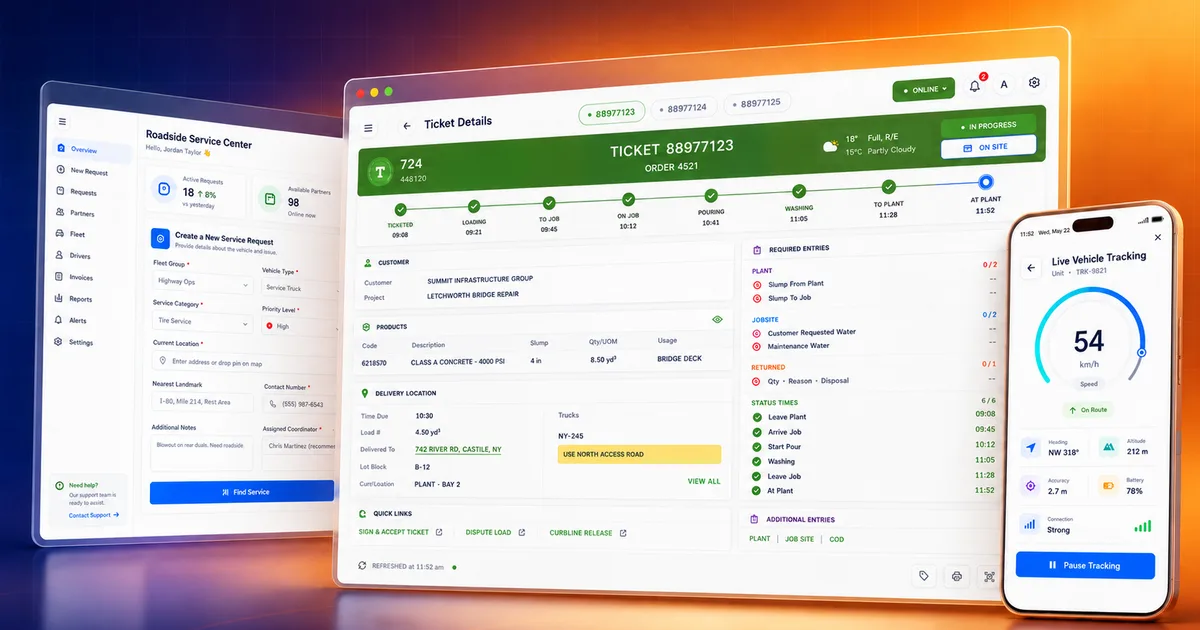
Delivery Ticket List
The driver dashboard with assigned tickets, delivery status, key figures and quick actions for the current load.
Plant & Jobsite Records
Tabbed entry for plant data, jobsite data, returned quantity, times and cash-on-delivery, covering the full delivery sequence.
Slump, Water & Temperature
The measurements that determine whether a load is accepted, captured at the point they are taken rather than written down for later.
Customer Signature Capture
On-screen signature pad for acceptance, with email and notes attached to the record.
Quantity Disputes
A dispute flow with reason and signature for when the delivered volume is contested at the site.
Curbline Release
A separate signature flow for unattended deliveries where no one is present to sign.
Mobile Ticket with QR
A printable ticket view with QR code, charges and timeline that can be shown or handed over on site.
Live Map & Route
Delivery location, route and truck position on a map, plus a dedicated view focused on the drop-off point.
Vehicle Tracking
Real-time speed, heading and trip data while the truck is moving.
Trip History
Historical trip summaries with distance, duration and driving-behaviour data from the device sensors.
Voice Form Wizard
Field-by-field voice input with spoken prompts, for filling delivery records without typing.
Offline Queue Status
The driver can see what is still waiting to sync, and syncing resumes automatically when the connection returns.
Push Notifications
Alerts for new work and incomplete delivery records, with an in-app history and read state.
Four Languages
English, French-Canadian, Spanish and Brazilian Portuguese, with the device locale detected automatically.
Two-Tier Sign-In
A company code establishes the tenant, then the driver signs in with truck and employee codes — built for tablets shared between drivers.
Accessibility Controls
Adjustable font scaling and a dark theme, for a screen used in a cab in changing light.
The Stack
Mobile App
Native & Device
Offline & Data
Voice, Maps & Ops
How We Built It
- 1
Offline as the Default Path
Writes go to the local queue first and sync second, so the online case is simply the queue draining quickly. There is no separate offline mode to fall into or forget to test.
- 2
A Native Service for the Trail
A custom Android foreground service collects location outside the JavaScript runtime, because the JavaScript thread stops when the system reclaims the app — and a location trail with holes in it cannot be reconstructed later.
- 3
Reconciling Two Sources of Truth
On launch the native records are imported into the app store and de-duplicated by timestamp and coordinates, so the same fix recorded by both layers is stored once.
- 4
Battery Work as a Feature
Idle detection and adaptive polling were built deliberately, with the native and JavaScript layers kept in the same idle state, because a tracking app that flattens the phone by mid-shift stops being used.
- 5
Merge Instead of Duplicate
When the same ticket and tab are saved repeatedly while offline, the queue merges the bodies rather than stacking near-identical entries, preserving every field the driver entered.
- 6
Two-Tier Auth for Shared Tablets
Company-level and driver-level sessions with silent token refresh, and session expiry handled gracefully even with no connection, because the device belongs to the truck rather than the person.
The Shape of What We Built
22
API Endpoints
10
Core Services
9
Driver Screens
4
Languages Supported
A delivery record is written locally first, so poor coverage at a plant or jobsite delays the sync rather than losing the data.
The location trail continues through the app being killed by the operating system, and is reconciled on the next launch.
Tracking steps itself down while the truck is stationary and back up when it moves, so a full shift does not flatten the device.
Drivers can complete a delivery record by voice, with prompts read aloud, instead of typing on a phone while working.
Frequently Asked Questions
Yes, and that is how this one is built. Every entry, signature and form value is written to a local queue first and synced afterwards, so being offline delays the upload rather than losing the record. The sync manager validates and de-duplicates queued items, backs off progressively, and separates temporary failures from permanent ones.
Services Behind This Build
Explore Other Case Studies
Does your field app stop working where your crews do?
If your team works in places the network does not reach, we will show you what an offline-first build and a native tracking layer change about the data you actually get back.
Talk to a Delivery Expert